
Overview #
The Contacts section is your central hub for managing all visitor interactions, lead data, and conversation analytics. Access it from the main navigation to view comprehensive interaction data from your chatbots.
Contact Categories #
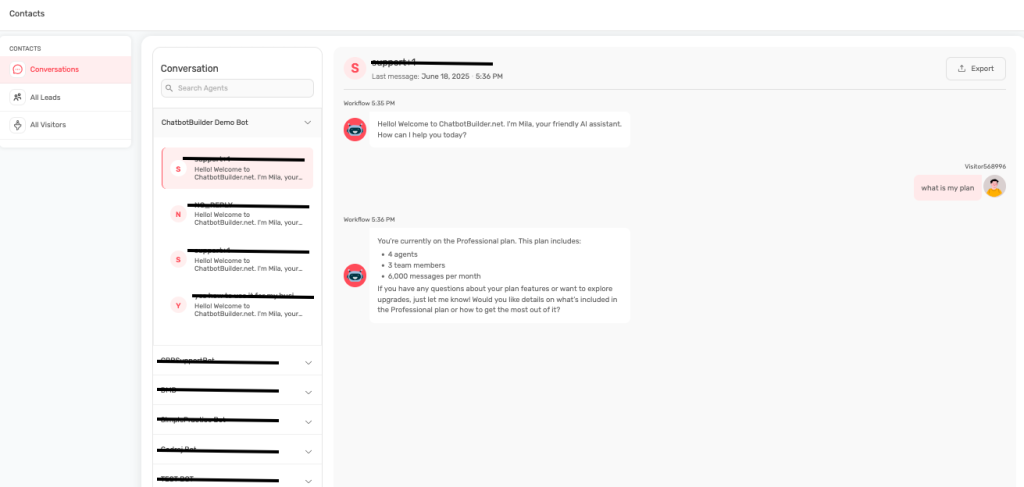
Conversations #
Purpose: View and analyze all chatbot interactions in detail
Interface Features:
- Search Functionality: Search agents using the search bar at the top
- Bot Selection: Filter conversations by specific bot using the “Bot No 1” dropdown
- Conversation List: Left sidebar shows all conversations with visitor IDs and last message details
- Chat Viewer: Main panel displays full conversation transcripts with timestamps
- Export Option: Export conversation data using the Export button
What You’ll See:
- Visitor identification numbers (e.g., “Visitor#135270”)
- Last message timestamps and times
- Complete conversation workflows with bot responses
- Message progression and user engagement patterns
Business Applications:
- Analyze conversation quality and completion rates
- Identify common user questions and pain points
- Track visitor engagement and response patterns
- Optimize conversation flows based on real interactions
All Leads #
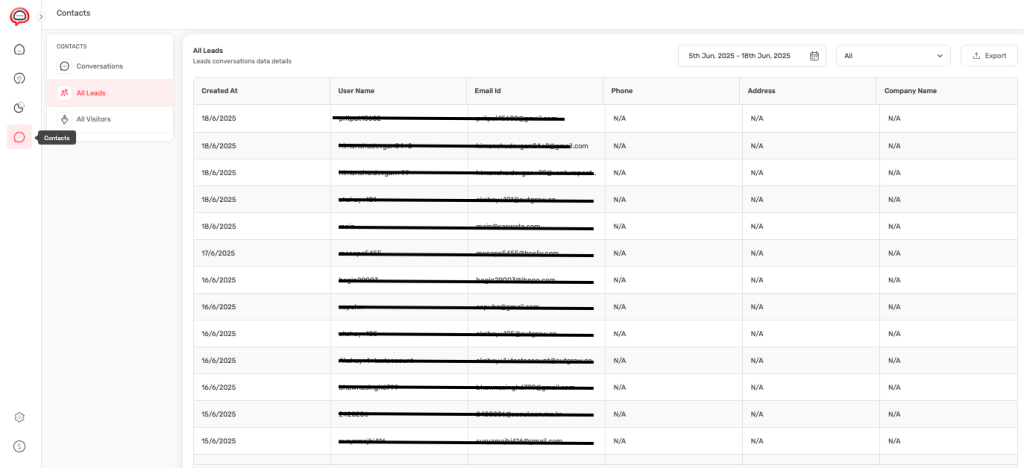
Purpose: Comprehensive database of captured lead information
Interface Layout:
- Date Filter: Select date ranges (5th Jun 2025 – 18th Jun 2025 format)
- Export Controls: Export lead data with filtering options
- Data Table Columns:
- Created At (timestamp)
- User Name
- Email Id
- Phone
- Address
- Company Name
Lead Management Features:
- Date Range Filtering: Custom date selection for lead analysis
- Export Functionality: Download lead data for CRM integration
- Comprehensive Data Fields: All captured information in organized columns
- Real-time Updates: New leads appear automatically as they’re captured
Data Applications:
- Export qualified leads for sales team follow-up
- Analyze lead capture trends over time periods
- Track lead source and quality metrics
- Integration with external CRM systems
All Visitors #
Purpose: Track all website visitors who interacted with your chatbot
Interface Elements:
- Visitor Data Table: Shows Created At, User Name, Address, Company Name
- Date Range Controls: Same filtering options as leads section
- Export Capabilities: Download visitor interaction data
- Empty State Messaging: Clear indication when no data is available
Visitor Analytics:
- Complete visitor interaction history
- Geographic and company information when available
- Engagement patterns and interaction frequency
- Conversion tracking from visitor to lead
Navigation and Data Management #
Sidebar Navigation #
Contact Categories:
- Conversations: Currently selected contact interactions
- All Leads: Qualified prospect database
- All Visitors: Complete visitor interaction log
- Contacts: General contact management (when applicable)
Data Export Options #
Export Functionality:
- Date-Filtered Exports: Select specific time periods for data
- Format Options: Download in standard formats for analysis
- Complete Data Sets: All captured fields included in exports
- Integration Ready: Formatted for CRM and marketing tool import