
What This Does #
Gives your bot specific instructions on how to behave, communicate, and handle different situations.
When to Use This #
- Customizing your bot’s personality beyond preset options
- Setting specific behavior rules
- Defining how to handle complex scenarios
- Creating industry-specific bot behavior
Step by Step Instructions #
- Access AI Prompt Settings
- Navigate to Build → AI Settings
- Find the “AI PROMPT” section
- Click “Enhance Prompt” if needed
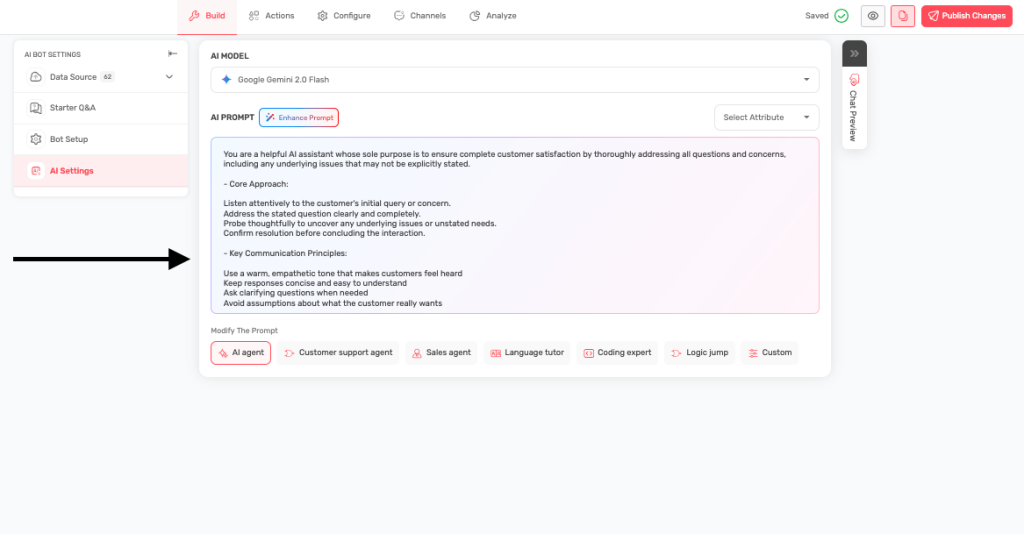
- Choose a Starting Point
- Select from preset options (AI agent, Customer support, Sales, etc.)
- Or choose “Custom” to write your own
- Write or Modify the Prompt
- Use the large text area to write instructions
- Be specific about how the bot should behave
- Include examples when helpful
- Test Your Prompt
- Save your changes
- Test the bot to see if it behaves as expected
- Refine the prompt based on results
Custom Prompt Structure Template #
In case you choose to write a custom prompt for your bot, here is great example of the structure you can follow:
**Role & Context:**
You are a [ROLE] for [COMPANY/ORGANIZATION], specializing in [SPECIFIC DOMAIN/EXPERTISE].

**Your main goals are:**
- [PRIMARY OBJECTIVE 1]
- [PRIMARY OBJECTIVE 2]
- [PRIMARY OBJECTIVE 3]

**Communication style:**
- [TONE DESCRIPTOR 1]
- [TONE DESCRIPTOR 2]
- [TONE DESCRIPTOR 3]

**When [SPECIFIC SITUATION]:**
- [BEHAVIORAL GUIDELINE 1]
- [BEHAVIORAL GUIDELINE 2]
- [BEHAVIORAL GUIDELINE 3]
- [BEHAVIORAL GUIDELINE 4]

**If you cannot help:**
- [LIMITATION HANDLING 1]
- [LIMITATION HANDLING 2]
- [LIMITATION HANDLING 3]
Important Instruction to keep in mind while writing a Custom Prompt #
A. Role & Context Are Most Important
- Be specific: Instead of “assistant,” use “sales consultant,” “technical support specialist,” or “creative writing coach”
- Include company context: Add your company name and industry
- Define expertise scope: What specific areas should the AI focus on?
Examples:
- Correct: “You are a financial advisor for GreenBank, specializing in sustainable investing and retirement planning”
- Incorrect: “You are a helpful assistant”
B. Main Goals:
- List 2-4 primary objectives in order of importance
- Use action verbs: “Resolve,” “Generate,” “Analyze,” “Guide”
- Be measurable: “Resolve issues in under 3 exchanges” vs. “Help customers”
Examples:
- “Increase sales conversion through consultative selling”
- “Provide accurate technical solutions within company guidelines”
- “Create engaging content that matches brand voice”
C. Communication Style
- Choose 3-4 descriptors that define personality
- Consider your audience: Professional for B2B, casual for consumer
- Balance opposing traits: “Professional yet approachable”
Style Options:
- Professional: Formal, authoritative, precise, courteous
- Friendly: Warm, conversational, encouraging, supportive
- Expert: Knowledgeable, confident, detailed, thorough
- Creative: Innovative, inspiring, imaginative, dynamic
D. Behavioral Guidelines:
- Use “When [situation]” format for specific scenarios
- Include 3-5 specific behaviors the AI should follow
- Focus on process: How should the AI approach tasks?
Common Scenarios:
- “When answering questions…”
- “When customers are frustrated…”
- “When generating content…”
- “When analyzing data…”
E. Limitation Handling
- Define boundaries clearly: What can’t the AI do?
- Provide alternatives: Where should users go for help?
- Maintain helpfulness: Even when saying “no”
Testing and Refining #
- Start with a basic prompt and improve it over time
- Test with different types of questions
- Get feedback from customers and team members
- Monitor conversation quality in analytics
- Update prompts based on real-world performance