
What This Does #
Creates and manages custom data fields that your bot can collect and use throughout conversations.
When to Use This #
- You need to collect specific business information
- You want to personalize conversations with custom data
- You need fields beyond the standard name/email/phone
- You’re integrating with systems that require specific data fields
Step-by-Step Instructions #
- Access Attributes Management
- Navigate to Configure
- Find “ATTRIBUTES SETTING” section
- Click on “All Attributes” to see existing fields
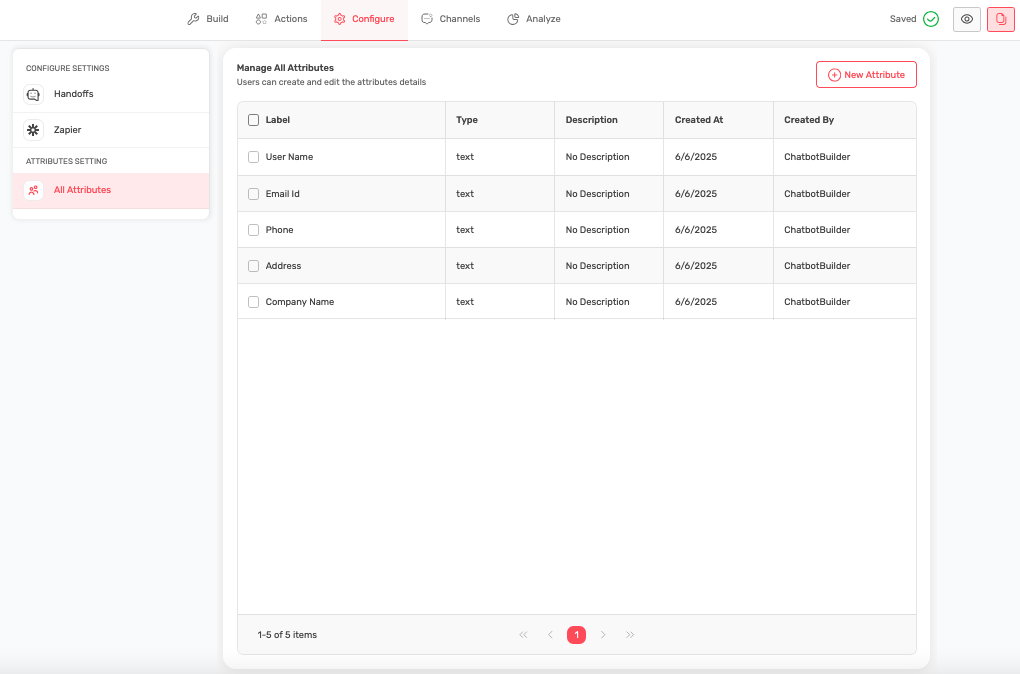
- Review Default Attributes
- See standard fields already available:
- User Name (text)
- Email Id (text)
- Phone (text)
- Address (text)
- Company Name (text)
- See standard fields already available:
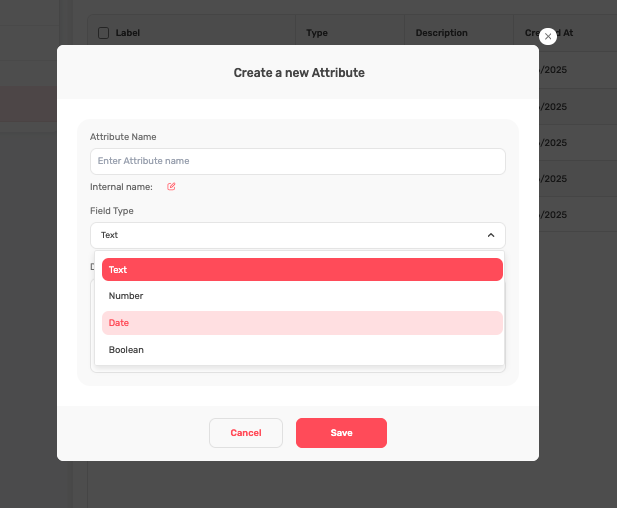
- Create New Custom Attributes
- Click “New Attribute” button
- Define the field name and type
- Set description for internal reference
- Configure validation rules if needed
- Manage Existing Attributes
- View all attributes in the table
- See creation date and creator
- Edit or delete attributes as needed
- Use pagination to browse multiple attributes
Types of Custom Attributes #
Text Fields:
- Job title or role
- Department or division
- Current software/tools used
- Specific needs or challenges
Boolean:
- A checkbox on a form representing user agreement to terms and conditions (checked = true, unchecked = false)
Numeric Fields:
- Number of employees
- Current subscription level
- Years in business
- Monthly volume/usage
Date Fields:
- Contract renewal date
- Implementation deadline
- Last service date
- Next review scheduled
Industry-Specific Attribute Examples #
SaaS/Software Business:
- Current software used
- Number of users/licenses
- Integration requirements
- Technical expertise level
- Implementation timeline
Healthcare:
- Date of birth
- Insurance provider
- Preferred appointment time
- Medical conditions/concerns
- Emergency contact
Real Estate:
- Property type interest
- Budget range
- Preferred location
- Timeline to purchase/sell
- Current housing situation
Professional Services:
- Service type needed
- Project scope
- Previous experience with service
- Preferred meeting times
- Decision-making process
Using Attributes in Conversations #
Data Collection:
- Attributes automatically appear in “Collect User Data” action
- Choose which attributes to collect for each conversation
- Set required vs. optional attributes
- Collect progressively throughout conversation
Personalization:
- Use collected attributes in responses
- Customize recommendations based on attributes
- Provide relevant examples and case studies
- Tailor conversation flow to user characteristics
Integration:
- Send attribute data to CRM systems
- Include in email templates
- Use for analytics and reporting
- Pass to external APIs
Best Practices for Attribute Management #
Naming Conventions:
- Use clear, descriptive names
- Be consistent across similar attributes
- Avoid abbreviations or code names
- Make names intuitive for team members
Data Quality:
- Validate data formats where possible
- Set appropriate field types
- Include help text or examples
- Review and clean data regularly
Privacy Compliance:
- Only collect necessary information
- Ensure compliance with privacy regulations
- Provide clear data usage explanations
- Allow users to update or delete information
Managing Attribute Lifecycle #
Planning New Attributes:
- Identify business need for data
- Define how data will be used
- Choose appropriate field type
- Plan integration with existing systems
Implementation:
- Create attribute with clear description
- Test data collection process
- Update bot configuration to use attribute
- Train team on new data field
Maintenance:
- Regularly review attribute usage
- Remove unused or outdated attributes
- Update descriptions as needed
- Monitor data quality and completeness
Tips for Success #
- Start with essential attributes only
- Add complexity gradually
- Test attribute collection thoroughly
- Keep descriptions clear and helpful
- Regularly audit and clean up unused attributes
- Ensure all team members understand attribute purposes
Common Mistakes to Avoid #
- Creating too many attributes at once
- Using unclear or confusing names
- Not setting appropriate field types
- Forgetting to remove outdated attributes
- Not documenting attribute purposes
- Collecting unnecessary personal information