
What This Does #
Identifies questions your bot couldn’t answer, helping you improve its knowledge and capabilities.
When to Use This #
- You want to expand your bot’s knowledge base
- You’re seeing low resolution rates in analytics
- You need to identify content gaps
- You want to improve bot performance systematically
Step-by-Step Instructions #
- Access Unanswered Queries
- Navigate to Analyze tab
- Scroll down to find “Unanswered Queries” section
- Review the list of questions bot couldn’t handle.
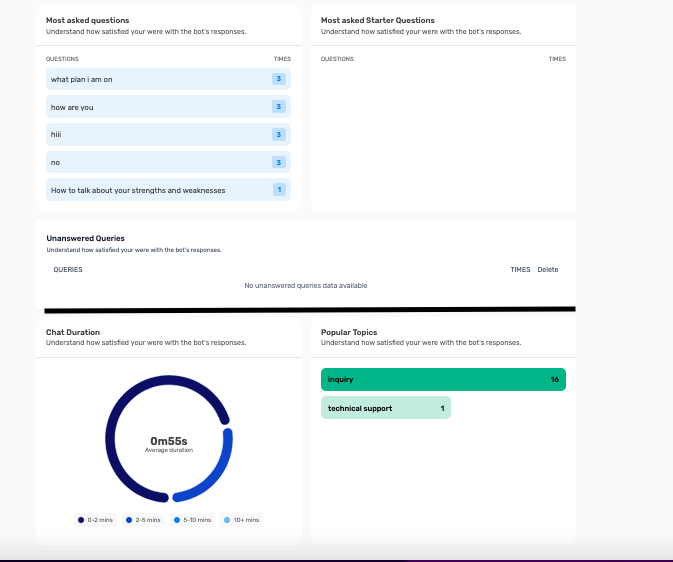
- Analyze the Query List
- QUERIES column: Shows exact questions users asked
- TIMES column: How often each question was asked
- Priority: Focus on high-frequency unanswered questions first
- Take Action on Findings
- Add content for frequently asked unanswered questions
- Create specific Q&A pairs for exact user language
- Update training materials to cover knowledge gaps
Understanding Unanswered Query Data #
High-Priority Items:
- Frequently asked questions: Questions appearing multiple times
- Business-critical topics: Questions about core products/services
- Customer pain points: Questions indicating user frustration
- Revenue-impacting: Questions that could affect sales or retention
Common Types of Unanswered Questions:
Product/Service Information:
- Specific feature details not in training data
- Pricing questions for new products
- Availability or inventory questions
- Technical specifications or requirements
Process and Procedure Questions:
- Step-by-step guides not covered
- Policy details or exceptions
- Account management procedures
- Troubleshooting steps for specific issues
Company-Specific Information:
- Recent news or announcements
- Staff or department information
- Location or contact details
- Current promotions or offers
Converting Unanswered Questions to Content #
Method 1: Add to Starter Q&A
- Copy the exact question from unanswered queries
- Navigate to Build → Starter Q&A
- Add question using user’s exact language
- Write comprehensive, helpful answer
Example:
<aside>
Unanswered Query: “Do you have student discounts?” Starter Q&A: Question: “Do you have student discounts?” Answer: “Yes! We offer a 20% student discount on all our plans. You’ll need to verify your student status with a valid .edu email address or student ID. Contact our sales team at students@company.com to get your discount code.”
</aside>
Method 2: Add to Text Area Training
- Go to Build → Data Source → Text Area
- Add comprehensive content covering the topic
- Include multiple variations of the question
- Provide detailed, complete answers
Example:
<aside>
STUDENT DISCOUNTS AND PRICING
Student Discount Program We offer a 20% discount to current students on all our subscription plans.
How to Qualify:
- Must be currently enrolled in an accredited institution
- Valid .edu email address OR current student ID
- Discount applies to individual plans only (not enterprise)
How to Apply:
- Contact our student support team at students@company.com
- Provide proof of enrollment
- Receive your unique discount code
- Apply code during checkout
Discount Details:
- 20% off monthly or annual plans
- Discount renews each year with proof of continued enrollment
- Cannot be combined with other offers
- Available worldwide for qualifying students </aside>
Method 3: Update Training Documents
- Review uploaded files or connected sources
- Add missing information to existing documents
- Upload new documents covering missing topics
- Refresh data sources to include updated content
Systematic Improvement Process #
Weekly Unanswered Query Review:
- Export or note all unanswered questions from past week
- Group by topic or category for easier handling
- Prioritize by frequency – handle most-asked questions first
- Assign to team members for content creation
- Set deadline for adding new content
Monthly Knowledge Gap Analysis:
- Review trends in unanswered questions over time
- Identify recurring themes or knowledge areas
- Plan comprehensive content to address gaps
- Create content calendar for systematic improvement
- Track resolution rate improvements after updates
Content Creation Guidelines #
Writing Effective Answers:
- Be comprehensive: Answer the question completely
- Use clear language: Avoid jargon or complex terms
- Include examples: Provide specific, helpful examples
- Add context: Explain why or provide background
- Offer next steps: Tell users what to do next
Optimizing for User Language:
- Use customer terminology: Match how users actually ask questions
- Include variations: Add different ways people ask the same thing
- Consider misspellings: Include common spelling variations
- Account for abbreviations: Include both full terms and acronyms
Measuring Improvement Impact #
Before and After Comparison:
- Resolution rate changes: Track improvement after adding content
- Question frequency: Monitor if questions stop appearing as unanswered
- User satisfaction: Check sentiment improvement for previously unanswered topics
- Escalation reduction: Measure fewer human handoffs for covered topics
Success Metrics:
- Reduced unanswered query volume: Fewer new unanswered questions
- Improved resolution rates: Higher percentage of successful interactions
- Better user satisfaction: More positive sentiment scores
- Decreased support tickets: Fewer escalations to human agents
Advanced Analysis Techniques #
Question Categorization:
- Group by topic: Organize questions into business areas
- Identify patterns: Look for common themes or missing knowledge areas
- Priority ranking: Focus on high-impact, high-frequency questions
- Difficulty assessment: Determine which questions need human expertise
Root Cause Analysis:
- Content gaps: Missing information in training data
- Language barriers: Bot doesn’t understand how users phrase questions
- Technical limitations: Questions requiring capabilities bot doesn’t have
- Process issues: Questions about procedures not documented
Prevention Strategies #
Proactive Content Planning:
- Anticipate customer questions: Think ahead about what users might ask
- Regular content audits: Review and update existing content
- Seasonal updates: Add content for seasonal questions or changes
- Product launch preparation: Add content before releasing new products
Team Collaboration:
- Customer service insights: Leverage human agent knowledge
- Sales team input: Include common sales questions
- Product team updates: Get information about new features
- Customer feedback: Use direct customer input for content planning
Tips for Success #
- Check unanswered queries weekly for continuous improvement
- Prioritize high-frequency questions for maximum impact
- Use customer language exactly when creating content
- Test new content by asking the bot updated questions
- Monitor resolution rate improvements after adding content
- Create comprehensive answers that don’t leave users hanging
- Document your improvement process for team consistency