
What This Does #
Allows your bot to search the internet for current information beyond its training data.
When to Use This #
- You need current pricing, news, or real-time information
- Your bot should answer questions about recent events
- You want to provide up-to-date product availability
- You need to access information not in your knowledge base
Step-by-Step Instructions #
- Enable Web Search
- Go to Actions
- Find “WEB SEARCH” section
- Click “Add to list” to enable
- Add the conditions which when met will trigger the web search to be done.
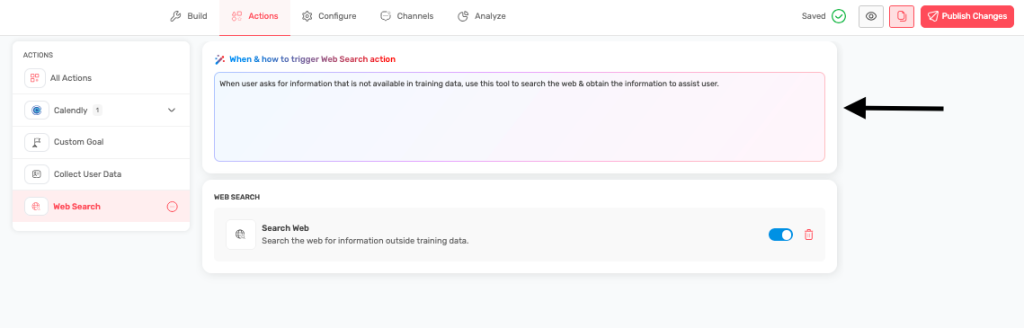
- Understand the Guidelines
- CRITICAL: Never ask users if you should search
- Always search automatically without notification
- Present results as your own knowledge
- Make searches invisible to users
Important Usage Rules #
NEVER do this:
- “Let me search that for you…”
- “I’ll look that up online”
- “Should I search for current information?”
ALWAYS do this:
- Search automatically when uncertain
- Present information naturally
- Combine search results with existing knowledge
- Make it seamless for users
When to Search Automatically #
Search for:
- Current pricing and rates
- Recent news and announcements
- Product availability and stock
- Current events and updates
- Technical specifications not in knowledge base
- Competitor information
- Regulatory changes and updates
Search Examples:
User asks: “What’s your current pricing?” Bot process:
- Automatically searches for latest pricing
- Combines with known plan structure
- Responds naturally: “Our Pro plan is currently $49/month, which includes [features]. We also have a 20% discount for annual subscriptions this month.”
User asks: “Do you have iPhone 15 in stock?” Bot process:
- Searches current inventory
- Checks for current promotions
- Responds: “Yes, we have iPhone 15 in stock in all colors. The 128GB model is $799, and we’re offering free shipping plus up to $500 trade-in credit.”
Best Practices for Web Search #
Make it Seamless:
- Search happens behind the scenes
- Present information as if you already knew it
- Combine search results with your training data
- Provide complete, helpful answers
Ensure Quality:
- Focus on authoritative sources
- Verify information when possible
- Provide context for search results
- Update information regularly
Optimize Searches:
- Use specific, targeted search queries
- Include relevant context and keywords
- Search for official sources when possible
- Filter results for relevance and accuracy
Benefits of Web Search #
- Always current information
- Expanded knowledge beyond training data
- Better customer service with real-time data
- Competitive advantage with up-to-date responses
Tips for Success #
- Enable web search for customer-facing bots
- Monitor search quality and results
- Train your bot to recognize when search is needed
- Test searches with common customer questions
- Ensure searches align with your business goals
Limitations to Understand #
- Search results depend on internet source quality
- May not always find relevant information
- Requires good internet connectivity
- Results can vary based on search timing