
What This Does #
Integrates your bot with Crisp customer messaging platform for unified customer communication and live chat handoffs.
When to Use This #
- You use Crisp for customer messaging and live chat
- You want to combine bot automation with human agents
- You need unified conversation management
- You want to maintain existing Crisp workflows
Step-by-Step Instructions #
- Access Crisp Integration
- Navigate to Configure
- Find the “Native” section
- Locate Crisp with its distinctive logo
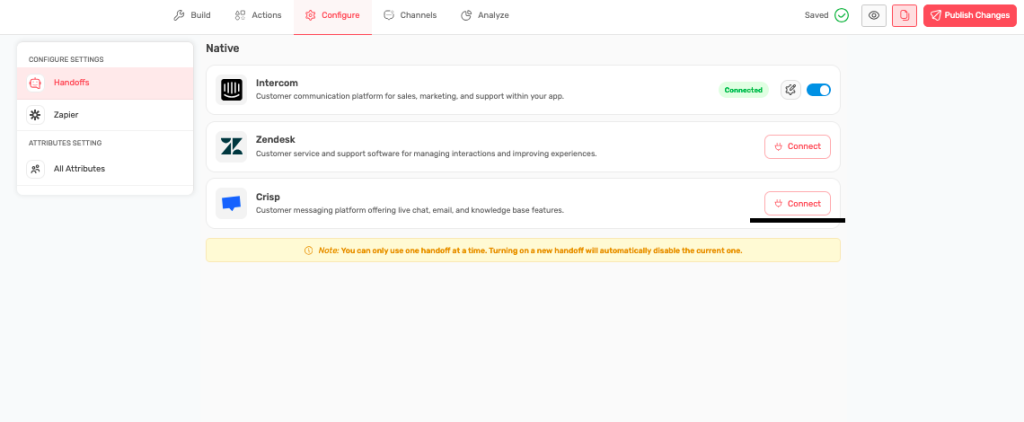
- Start Connection Process
- Click “Connect” button next to Crisp
- Enter your Crisp Website ID and click on Next to authenticate the ID.
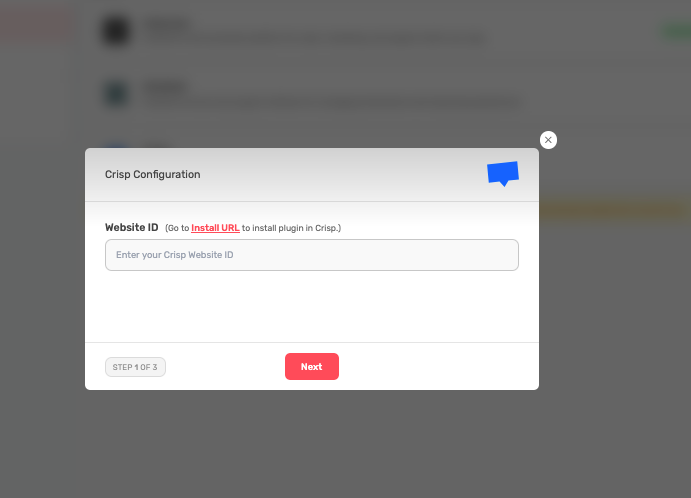
- Setting Up Handoff Workflows – When to transfer to Crisp Agents:
- Bot cannot resolve complex issues
- User requests human assistance
- Technical problems requiring expertise
- High-value customer interactions
Handoff Message Example: “I understand this needs personal attention. Let me connect you with one of our support specialists who can provide detailed assistance. They’ll have full context of our conversation.”
- Handoff Process:
- Bot recognizes the need for human help
- Explains the transfer to the customer
- Preserves conversation context
- Routes to the appropriate Crisp agent
- Agent receives full conversation history
- Verify Connection
- Click on Save and return to Chatbotbuilder dashboard
- Confirm “Connected” status appears
- Test the integration with a sample conversation
Understanding the Single Integration Limit #
Why Only One Integration?
- Prevents conflicting handoff systems
- Ensures clear escalation paths
- Maintains consistent user experience
- Avoids technical conflicts
Before Switching to Crisp:
- Disable current integration (if any)
- Plan the migration of existing workflows
- Inform the team about the change
- Test thoroughly before going live
What Crisp Integration Provides #
Unified Messaging:
- Bot and human conversations in Crisp interface
- Complete conversation history preserved
- Seamless handoff between bot and agents
- Consistent customer experience
Live Chat Features:
- Real-time customer engagement
- Agent availability status
- File sharing and media support
- Customer satisfaction tracking
Team Collaboration:
- Agent assignment and routing
- Internal notes and collaboration
- Performance metrics and analytics
- Workflow automation
Benefits of Crisp Integration #
For Customers:
- Smooth transition from bot to human
- No information repetition required
- Consistent support experience
- Multiple communication options
For Support Teams:
- Full conversation context available
- Existing Crisp workflows maintained
- Unified customer interaction history
- Real-time collaboration tools
For Business:
- Improved customer satisfaction
- Efficient resource utilization
- Comprehensive analytics
- Scalable support solution
Crisp-Specific Features #
Customer Messaging:
- Multi-channel communication (web, mobile, email)
- Rich media support (images, documents, videos)
- Automated responses and workflows
- Customer segmentation and targeting
Agent Tools:
- Real-time typing indicators
- Canned responses and shortcuts
- Customer information sidebar
- Conversation history and notes
Analytics and Reporting:
- Response time metrics
- Customer satisfaction scores
- Agent performance tracking
- Conversation volume analysis
Best Practices for Crisp Integration #
Setup Optimization:
- Configure agent availability schedules
- Set up appropriate routing rules
- Customize automated responses
- Organize team assignments
Workflow Integration:
- Align bot handoffs with Crisp workflows
- Train agents on bot conversation context
- Set up escalation procedures
- Define response time expectations
Performance Monitoring:
- Track handoff success rates
- Monitor customer satisfaction
- Analyze escalation patterns
- Optimize based on data insights
Troubleshooting Integration Issues #
Connection Problems:
- Verify Crisp account permissions
- Check API access credentials
- Confirm workspace configuration
- Try reconnecting integration
Handoff Issues:
- Review agent availability settings
- Check routing rule configuration
- Verify conversation transfer settings
- Test with sample interactions
Tips for Success #
- Plan the integration migration carefully
- Train your team on new workflows
- Test extensively before full deployment
- Monitor performance metrics closely
- Gather feedback from agents and customers
- Continuously optimize based on usage data
Migration Considerations #
- Export important data from previous integration
- Update documentation and training materials
- Communicate changes to all stakeholders
- Have rollback plan ready if needed
- Monitor system performance during transition