
What This Does #
Sets up how your bot behaves in different situations and how it handles conversations.
When to Use This #
- Defining your bot’s personality and communication style
- Setting up escalation procedures
- Configuring how the bot handles problems it can’t solve
- Creating a consistent brand experience
Step-by-Step Instructions #
- Access Behaviour Settings
- Go to Build → Bot Setup
- Find the “Bot & User Description” section
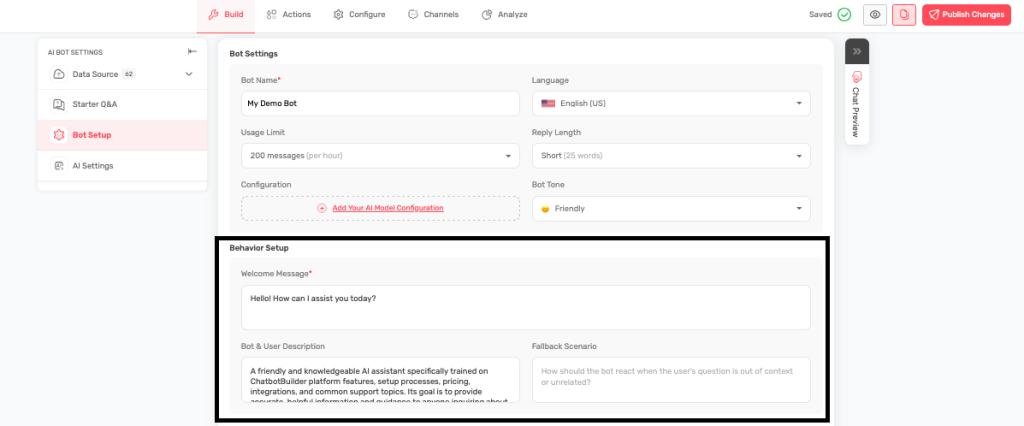
- Define Bot Description
- Describe what your bot does and how it should behave
- Include the bot’s role, expertise, and personality
- Specify how it should communicate
- Set User Description
- Describe your typical users
- Include their needs, experience level, and expectations
- This helps the bot adjust its communication style
- Configure Fallback Scenario
- Write what happens when the bot can’t help
- Include escalation options (email, phone, live chat)
- Provide alternative resources
Example Bot Descriptions #
Customer Support Bot: “You are a helpful customer service representative for [Company Name]. You specialize in helping customers with product questions, order support, and general inquiries. Always be patient, thorough, and solution-focused. If you can’t solve a problem completely, guide customers to human support.”
Sales Assistant: “You are a knowledgeable sales consultant for [Company Name]. Your goal is to help potential customers understand our products and find the right solution for their needs. Be consultative, not pushy. Focus on benefits and value. Qualify leads and schedule demos when appropriate.”
Technical Support: “You are a technical support specialist for [Product Name]. You help users troubleshoot problems and learn how to use our software. Be patient with users of all skill levels. Provide step-by-step instructions and ask follow-up questions to ensure problems are resolved.”
Example User Descriptions #
Small Business Customers: “Our users are primarily small business owners and managers. They value efficiency and clear, actionable advice. They may not be highly technical, so explanations should be simple and practical.”
Enterprise Clients: “Our users are professionals at large companies. They need detailed, accurate information and often have complex requirements. They appreciate thorough, professional communication.”
Fallback Message Examples #
Professional Approach: “I don’t have specific information about that topic, but I want to make sure you get the help you need. For detailed questions like this, our human support team can provide personalised assistance. You can reach them at support@company.com or call 555-123-4567.”
Friendly Approach: “I wish I could help with that, but it’s outside my area of expertise. No worries, though – our amazing support team can definitely help! You can email them at help@company.com or call 555-123-4567. They usually respond within a few hours.”
Tips for Success #
- Be specific about your bot’s role and capabilities
- Match the tone to your brand personality
- Always provide alternative help options in fallback scenarios
- Test different approaches and see what works best
- Update descriptions based on customer feedback