
What This Does #
Lets you select which AI model powers your bot, affecting response quality, speed, and capabilities.
When to Use This #
- Setting up a new bot
- Optimizing for specific needs (speed vs. quality)
- Improving bot performance
- Adjusting for high-volume usage
Step-by-Step Instructions #
- Access AI Settings
- Go to Build → AI Settings
- You’ll see the AI Model selection dropdown
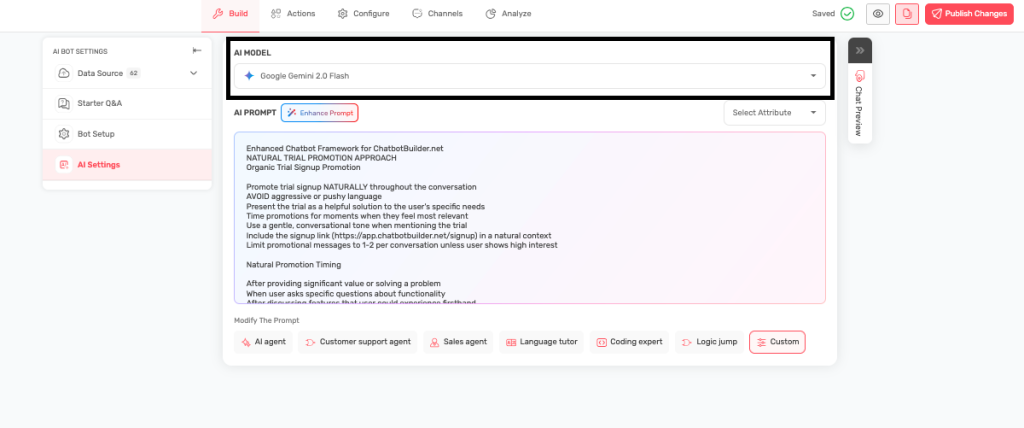
- Review Available Models
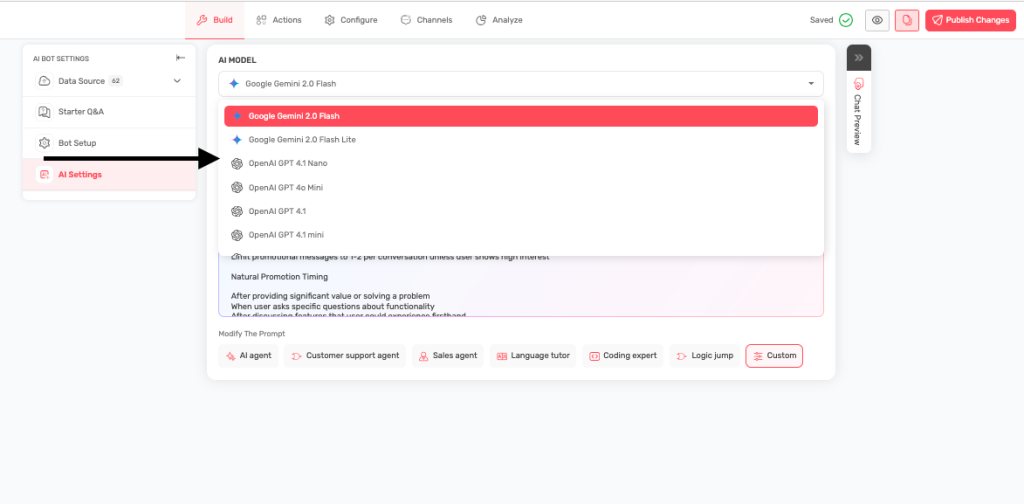
- See the list of available AI models
- Each has different strengths and speeds
- Select Your Model
- Click the dropdown to see options
- Choose based on your specific needs
- Test Performance
- Save your selection
- Test the bot to see how it performs
- Adjust if needed
Available Models Explained #
Google Gemini 2.0 Flash
- Best for: Most general business uses
- Speed: Very fast responses
- Quality: High-quality, natural conversations
- Good for: Customer service, sales support, general inquiries
Google Gemini 2.0 Flash Lite
- Best for: High-volume, simple interactions
- Speed: Extremely fast
- Quality: Good for straightforward questions
- Good for: Basic FAQ bots, simple information lookup
OpenAI GPT-4.1
- Best for: Complex conversations requiring deep understanding
- Speed: Slower but very thorough
- Quality: Highest quality responses
- Good for: Complex customer service, detailed explanations
OpenAI GPT-4.1 Mini
- Best for: Balanced performance and cost
- Speed: Moderate speed
- Quality: Good quality responses
- Good for: Standard business applications
Anthropic 4 Sonnet (Recommended)
- Best for: Balanced performance for a wide range of complex tasks
- Speed: Slower but very thorough
- Quality: Highest quality responses
- Good for: Creative content generation, detailed analysis, complex problem-solving
Anthropic 3.7 Sonnet
- Best for: General-purpose use with a focus on speed and efficiency for everyday tasks
- Speed: Slower but very thorough
- Quality: High, but potentially less nuanced than Anthropic 4
- Good for: Summarization, drafting emails, moderate complexity coding assistance
Anthropic 3.5 Sonnet
- Best for: Efficient and reliable performance for common language tasks
- Speed: Fast
- Quality: Good quality responses
- Good for: Customer service interactions, simple content creation, data extraction
Anthropic 3.5 Haiku
- Best for: High-volume, simple interactions
- Speed: Extremely fast
- Quality: Good for straightforward questions
- Good for: Basic FAQ bots, simple information lookup, quick responses
Grok 3
- Best for: Advanced reasoning and comprehensive knowledge
- Speed: Fast
- Quality: Very High
- Good for: Deep dives, complex problem-solving, nuanced understanding
Grok 3 Fast
- Best for: Prioritizing speed for general use
- Speed: Extremely Fast
- Quality: High, with some potential trade-offs for speed
- Good for: Real-time applications, quick information retrieval
Grok 3 Mini
- Best for: Lightweight, efficient performance for mobile or resource-constrained environments
- Speed: Very Fast
- Quality: Good for common tasks
- Good for: Mobile applications, simple chatbot interactions, quick drafting
Grok 3 Mini Fast
- Best for: Maximum speed for very simple, high-volume requests in constrained environments
- Speed: Utmost Fast
- Quality: Good for straightforward queries, potentially less depth
- Good for: High-throughput simple tasks, quick checks
How to Choose the Right Model #
Customer Service
- High volume, simple queries: Gemini 2.0 Flash Lite, Anthropic 3.5 Haiku
- Standard volume: Gemini 2.0 Flash, Anthropic 3.5 Sonnet
- Complex issues: GPT-4.1, Anthropic 4 Sonnet, Claude 3.7 Sonnet
- Emotional/nuanced support: Anthropic 4 Sonnet, GPT-4.1
Sales & Marketing
- Product information: Gemini 2.0 Flash, Anthropic 3.5 Sonnet
- Consultative selling: GPT-4.1, Anthropic 4 Sonnet, Claude 3.7 Sonnet
- Lead qualification: Gemini 2.0 Flash, GPT-4.1 Mini
- Creative content: Anthropic 4 Sonnet, GPT-4.1
Technical Support
- Simple troubleshooting: Gemini 2.0 Flash, Anthropic 3.5 Sonnet
- Complex problem-solving: GPT-4.1, Claude 3.7 Sonnet, Grok 3
- Code assistance: GPT-4.1, Claude 3.7 Sonnet, Anthropic 4 Sonnet
- Documentation queries: GPT-4.1 Mini, Anthropic 3.5 Sonnet
Development & Coding
- Code generation: GPT-4.1, Claude 3.7 Sonnet, Anthropic 4 Sonnet
- Code review: Claude 3.7 Sonnet, GPT-4.1
- Simple scripts: GPT-4.1 Mini, Gemini 2.0 Flash
- Complex debugging: Claude 3.7 Sonnet, Grok 3
Research & Analysis
- Quick research: Gemini 2.0 Flash, Grok 3
- Deep analysis: Anthropic 4 Sonnet, GPT-4.1, Grok 3
- Real-time information: Grok 3 (with X integration)
- Long documents: Claude 3.7 Sonnet, GPT-4.1
Performance vs. Cost Framework #
Speed Tier (Fastest Response)
- Best for: High-volume interactions, simple queries, real-time chat
- Models: Gemini 2.0 Flash Lite, Anthropic 3.5 Haiku, Grok 3 Mini
- Cost: Lowest
Balanced Tier (Speed + Quality)
- Best for: Standard business applications, moderate complexity
- Models: Gemini 2.0 Flash, Anthropic 3.5 Sonnet, GPT-4.1 Mini
- Cost: Medium
Premium Tier (Highest Quality)
- Best for: Complex reasoning, nuanced understanding, critical applications
- Models: GPT-4.1, Anthropic 4 Sonnet, Claude 3.7 Sonnet, Grok 3
- Cost: Highest
Testing Your Choice #
- Try different models with the same questions
- Check response speed and quality
- Get feedback from users
- Monitor analytics for performance changes
- Switch models if needed
Tips for Success #
- Start with Gemini 2.0 Flash for most use cases
- Upgrade to GPT-4.1 if you need better understanding
- Use Lite versions for high-volume, simple bots
- Test thoroughly before going live
- Monitor performance and adjust as needed