





What This Does #
Creates the first message users see when they start chatting with your bot.
When to Use This #
- Setting up a new bot
- Improving first impressions
- Clearly communicating what your bot can help with
- Setting expectations for users
Step-by-Step Instructions #
- Find Welcome Message Settings
- Navigate to Build → Bot Setup
- Look for the “Behaviour Setup” section
- Find the “Welcome Message” field
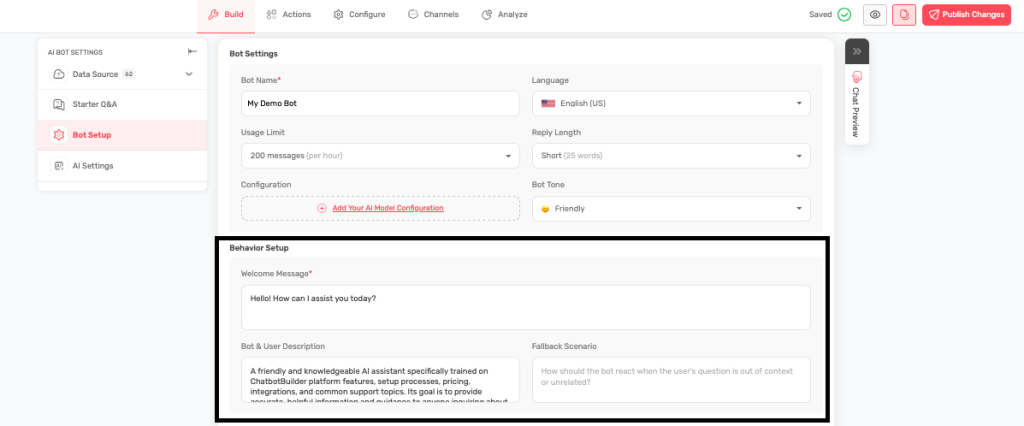
- Write Your Welcome Message
- Keep it friendly and helpful
- Explain what your bot can do
- Ask an engaging question
- Stay under the character limit
- Test Your Message
- Save your changes
- Test the bot to see how the welcome message appears
- Make sure it sounds natural and helpful
Examples of Good Welcome Messages #
Customer Support Bot: “Hi there! I’m Sarah, your customer support assistant. I can help you with order questions, product information, returns, and general support. What can I help you with today?”
Sales Bot: “Welcome! I’m Alex, and I’m here to help you find the perfect solution for your needs. I can share product details, pricing information, and help you make the best choice. What are you looking for?”
Booking Bot: “Hello! I’m here to help you schedule an appointment. I can show you available times, explain our services, and get you booked quickly. What service are you interested in?”
General Business Bot: “Hi! I’m the [Company Name] assistant. I can help with questions about our products, services, policies, and more. How can I assist you today?”
Tips for Great Welcome Messages #
- Use the bot’s name to make it personal
- Clearly state what the bot can help with
- End with a question to encourage interaction
- Keep it conversational and friendly
- Avoid being too salesy or pushy
What to Include #
- A friendly greeting
- The bot’s name/role
- 3-4 main things the bot can help with
- An engaging question to start the conversation
What to Avoid #
- Long, wordy messages
- Technical jargon
- Too many options that overwhelm users
- Generic greetings like “Hello” with no context
Testing and Improving #
- Try different versions and see which works better
- Ask for feedback from customers
- Monitor analytics to see if people engage after the welcome message
- Update the message based on what customers actually ask about