





Chatbotbuilder.net‘s integration ecosystem connects your chatbots with the tools you already use, creating seamless workflows that eliminate data silos and automate business processes. Our native integrations are designed for reliability, security, and ease of use.
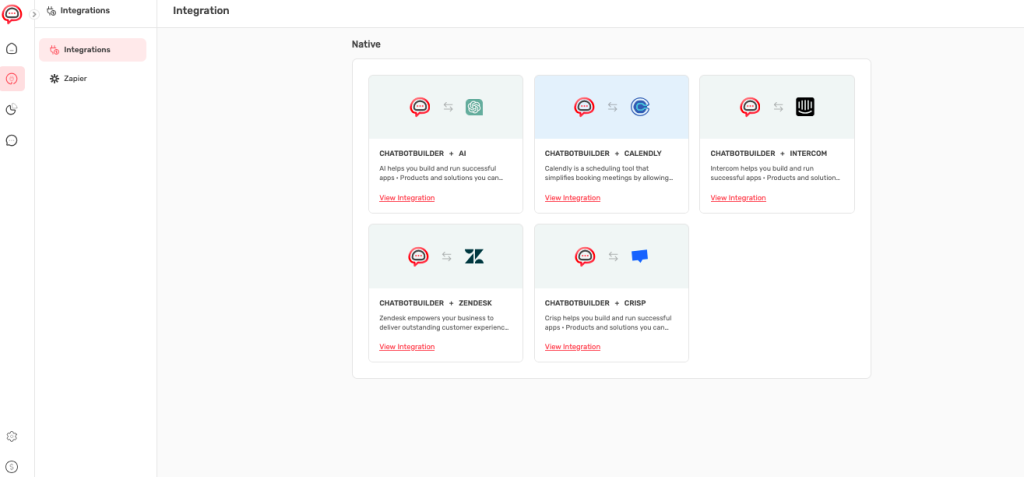
Native Integrations Portfolio #
Core Platform Integrations
Chatbotbuilder + AI Enhancement:
- Advanced NLP: Enhanced natural language processing for more accurate intent recognition
- Contextual Understanding: Improved conversation context retention across interactions
- Smart Responses: AI-driven response generation based on conversation history
- Continuous Learning: AI models that improve based on interaction patterns
Chatbotbuilder + Calendly:
- Seamless Booking: Direct appointment scheduling within chat conversations
- Real-Time Availability: Live calendar integration showing actual availability
- Automated Confirmations: Automatic booking confirmations and reminders
- Calendar Sync: Bidirectional synchronization with your existing calendar systems
Chatbotbuilder + Intercom:
- Unified Communications: Single platform for all customer messaging channels
- Context Transfer: Complete conversation history transfers to human agents
- Team Routing: Intelligent routing based on inquiry type and team expertise
- Performance Analytics: Combined metrics across automated and human interactions
Chatbotbuilder + Zendesk:
- Automatic Ticketing: Seamless ticket creation from complex chatbot conversations
- Priority Assignment: Intelligent priority setting based on conversation content
- Agent Context: Complete conversation history available to support agents
- Resolution Tracking: End-to-end tracking from chat to ticket resolution
Chatbotbuilder + Crisp:
- Live Chat Integration: Smooth handoff from bot to human agents
- Unified Inbox: All customer communications in single management interface
- Team Collaboration: Multi-agent support with conversation assignment
- Advanced Analytics: Comprehensive reporting across all communication channels
Integration Setup and Configuration #
Setup Process for Native Integrations
Standard Integration Workflow:
- Integration Discovery
- Navigate to Integrations section from main navigation
- Review available native integrations and their capabilities
- Click “View Integration” on desired service
- Authentication Process
- Follow platform-specific authentication requirements
- Authorize ChatbotBuilder.net access to your external service
- Verify connection permissions and scope
- Configuration Setup
- Configure data mapping between platforms
- Set up trigger conditions and automation rules
- Define workflow parameters and notification preferences
- Testing and Validation
- Test integration functionality with sample data
- Verify data flow accuracy and timing
- Confirm error handling and fallback procedures
Advanced Integration: Zapier #
Comprehensive Automation Platform: Connect ChatbotBuilder.net with thousands of applications.
Zapier Integration Interface:
- Account Connection: Seamless sign-up or login process with existing Zapier account
- Automation Designer: Natural language description of desired automation workflows
- App Connection Hub: Connect ChatbotBuilder with 5,000+ supported applications
- Template Library: Pre-built workflows for common business use cases
Popular Workflow Examples:
- Lead Management: “Create spreadsheet rows in Google Sheets for new leads in ChatbotBuilder”
- Email Marketing: “Add new ChatbotBuilder leads to Mailchimp mailing lists”
- CRM Integration: “Create Salesforce contacts from ChatbotBuilder conversations”
- Project Management: “Create Trello cards for support requests from chatbot”
- Notification Systems: “Send Slack messages for high-priority chatbot interactions”